
Profit split and payout schedule
The profit split is the portion of eligible net profit allocated to the trader under the selected plan. The payout schedule or speed describes when an eligible request can be made or processed; it is not a guarantee that every request is paid immediately.
Check the profit split and payout fields shown for the plan you purchased. Do not use an example percentage or timetable from another challenge.
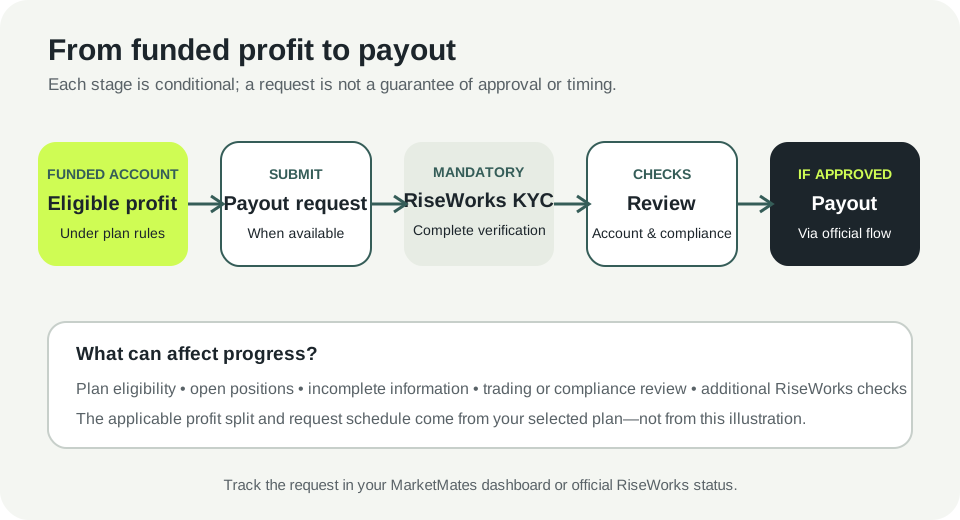
Before requesting a payout
Confirm that the plan-specific waiting period from your first trade has elapsed, eligible profit is at least 2%, required KYC is complete, and the funded account is available for a payout request in your dashboard. The account remains subject to trading-risk and compliance review.
Submit the request through the dashboard. The request timeframe varies by plan, so use the purchased-plan details and dashboard rather than a timetable from another plan.
Identity and payment checks
MarketMates identity verification and RiseWorks payout verification are separate steps. RiseWorks is a third-party provider that collects its own information and makes its own approval decision. You must complete its KYC before you can receive a payout. Complete the verification only through the official MarketMates or RiseWorks flow. RiseWorks may request identity documents for KYC, but MarketMates support will not ask for your trading password, one-time code, recovery code or private key.
Track a request
After submitting, use the MarketMates dashboard or your official RiseWorks status to check progress. Processing can take longer if information is incomplete, a compliance or trading review is required, or RiseWorks needs an additional check. Avoid submitting duplicate requests unless support instructs you to do so.
Troubleshooting
The payout option is unavailable
Check the account status, plan timing, open positions and any verification or review notice in the dashboard. If no reason is shown, contact support with the challenge or funded-account reference and a redacted screenshot.
The displayed split or schedule is not what you expected
Compare your dashboard with your plan confirmation and current terms. If they do not match, do not submit the request until support confirms which terms apply.
Check current Prop Trading challenges, rules, and plan details